
Your power goes out, and the computer on your desk keeps running. A small box under the table clicks, beeps, and quietly takes over. Most people never wonder what happens inside that box.
If you’re a student, a technician, or a curious buyer, this guide walks through an offline UPS circuit diagram in plain language. You’ll see what each part does, how the UPS behaves on normal power and during an outage, and what to look for when you buy one. You can also see our detailed page on the offline UPS circuit diagram.
What Is an Offline UPS?
An offline UPS is also called a standby UPS. It’s the simplest and most affordable type of uninterruptible power supply. When the mains power is fine, your devices run directly on it. The UPS just keeps its battery charged and waits. The moment the power fails, it switches over to battery, and its inverter produces AC power for your devices.
Because it only works “when needed”, it is called offline, which means the inverter is not in the main power path. For the wider background, see this overview of uninterruptible power supplies.
Offline UPS Block Diagram
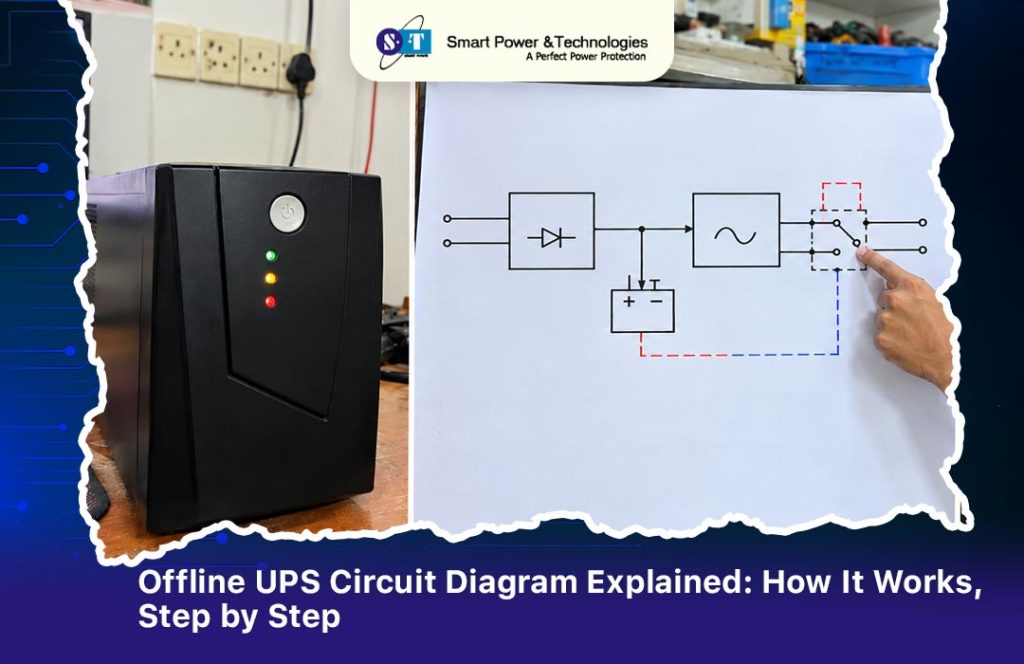
Here is a simplified block diagram of an offline UPS in normal mode. The main path runs along the top, and the battery side runs along the bottom.
AC MainsInputFilter & SurgeProtectionTransferSwitch (Relay)OutputYour devicesChargerAC to DCBatteryStored DC powerInverterDC to ACControlCircuitsenses mainsSolid lines: normal mode. Dashed line: inverter path, used only during an outage.
The Main Parts of an Offline UPS
- Input filter and surge protection. Incoming power first passes through a fuse or breaker, a surge-protection component (commonly an MOV), and a noise filter. This removes spikes and electrical noise before they reach your devices.
- Transfer switch (relay). This is the “gate” that decides whether your devices get mains power or inverter power. In normal mode it connects your load to the mains. During an outage it switches to the inverter. A relay is an electrically controlled switch, which is why you hear a click when it changes.
- Charger (rectifier). It converts AC from the mains into DC and tops up the battery whenever the mains is healthy. This is why a UPS stays ready even if you rarely use it.
- Battery. Most small UPS units use a sealed lead-acid battery. It stores the DC energy that keeps your devices alive during an outage. Battery size decides how long the backup lasts.
- Inverter. The inverter turns the battery’s DC back into AC. It usually uses power switching devices (like MOSFETs), controlled by an oscillator, and a step-up transformer to raise the voltage to mains level. Read more about how power inverters work.
- Control circuit. This is the brain, usually a small microcontroller. It watches the mains voltage, decides when to switch to battery, drives the relay and the inverter, controls charging, and runs the display, beeper and protection features.
How an Offline UPS Works: Step by Step
Normal mode (mains is available)
- Mains power enters the UPS and passes through the filter and surge protection.
- The relay connects it straight to your devices. This is why an offline UPS is very efficient and runs cool and quiet.
- At the same time, the charger keeps the battery full.
- The inverter stays idle.
Backup mode (power failure or very bad voltage)
- The control circuit detects that the mains has dropped, or is far too low or too high.
- It starts the inverter and flips the relay.
- Your devices now run from the battery, through the inverter. The UPS usually beeps to let you know.
- When the mains returns and is stable, the control circuit switches the load back and recharges the battery.
The switch takes a few milliseconds, which most computers and routers ride through without noticing. It is not zero, though, and that is the main weakness of this design.
Pros and Cons of an Offline UPS
Advantages
- Lower price than other UPS types.
- Simple design, with fewer parts to fail.
- High efficiency, since power passes straight through in normal mode.
- Light, compact, and quiet.
Limitations
- A short switching delay when the power fails.
- Little or no correction of voltage swings, so the battery is used more often when voltage is poor.
- The output on many low-cost models is not a pure sine wave, which some sensitive equipment dislikes.
- Not suited to critical equipment such as servers or medical devices.
Offline vs. Line-Interactive vs. Online UPS
| Feature | Offline | Line-Interactive | Online |
| Transfer time | Short delay | Short delay | None |
| Voltage correction | Minimal | Basic | Full |
| Cost | Lowest | Medium | Highest |
| Best for | Home PC, router | Home, small office | Servers, clinics, factories |
If your equipment can’t afford any interruption, see our guide to the best online UPS in Bangladesh.
How to Choose an Offline UPS in Bangladesh
- Capacity. Add up the wattage of everything you’ll connect and add about 20–25% headroom. Check the watt rating, not just the VA number.
- Backup time. Think about how long your outages usually last, and choose battery size to match.
- Voltage range. A wide input range means the UPS tolerates poor power without draining the battery.
- Output waveform. Choose a pure sine wave model if you’re protecting sensitive equipment.
- Protection features. Look for overload, short-circuit and deep-discharge protection.
- Battery replacement. Ask about battery life, cost, and local availability.
- Warranty and service. Check the warranty terms and whether the seller offers after-sales support. For product standards, you can visit the Bangladesh Standards and Testing Institution (BSTI).
If the voltage where you live swings a lot, you may also want a stabilizer for appliances that shouldn’t run on a UPS. See our guide to the best voltage stabilizer in Bangladesh. And to explore models, visit our offline UPS page [ADD: your offline UPS product page URL if different].
Care Tips and a Safety Note
- Keep the UPS in a cool, dry, ventilated place, because heat shortens battery life.
- Don’t overload it, and don’t plug in heavy appliances like ACs or heaters.
- Test the backup occasionally by switching off the mains for a moment.
- Replace the battery when it weakens rather than waiting for it to fail.
- Never open a UPS to experiment. The battery and capacitors can hold dangerous energy even when it’s unplugged. Leave repairs to a qualified technician.
Frequently Asked Questions
What is the working principle of an offline UPS?
It passes mains power straight to your devices while charging its battery. When the mains fails, it switches to the battery and uses an inverter to supply AC power.
Why is it called offline?
Because the inverter is “off” in the main power path during normal operation. It only starts when the power fails.
How fast does an offline UPS switch to battery?
Typically within a few milliseconds, depending on the model. That is fast enough for most computers and networking gear.
Can an offline UPS run a fridge or an AC?
Generally no. Compressor loads draw large startup currents that small UPS units aren’t designed for.
What is the difference between a UPS and an inverter?
A UPS switches over in milliseconds and is designed for electronics. A home inverter system usually switches more slowly and is aimed at running lights, fans and similar loads.
Which is better for a home PC: offline or line-interactive?
If your voltage fluctuates often, line-interactive is better, because it corrects minor swings without draining the battery. For a basic setup with stable power, offline is fine.
The Bottom Line
An offline UPS is a simple idea: pass the mains through, keep a battery charged, and let a small inverter take over when the lights go out. It’s affordable and reliable for home computers, routers, and basic office equipment. For sensitive or critical systems, a line-interactive or online UPS is the safer choice. Match the type and capacity to your needs, and buy from a seller who supports you after the sale.
Not Sure Which UPS Is Right for You?
Tell us what you want to protect and how long you need backup, and our team will recommend the right UPS for your home, office, or business.
Chat with us on WhatsApp | Call Us Now